An AI that can send texts, answer reviews and book appointments in your name needs a leash. Staffhand builds the leash first. Four rules apply to every build, every desk and every client, and four things you can see every day prove they are being followed.
The four rules
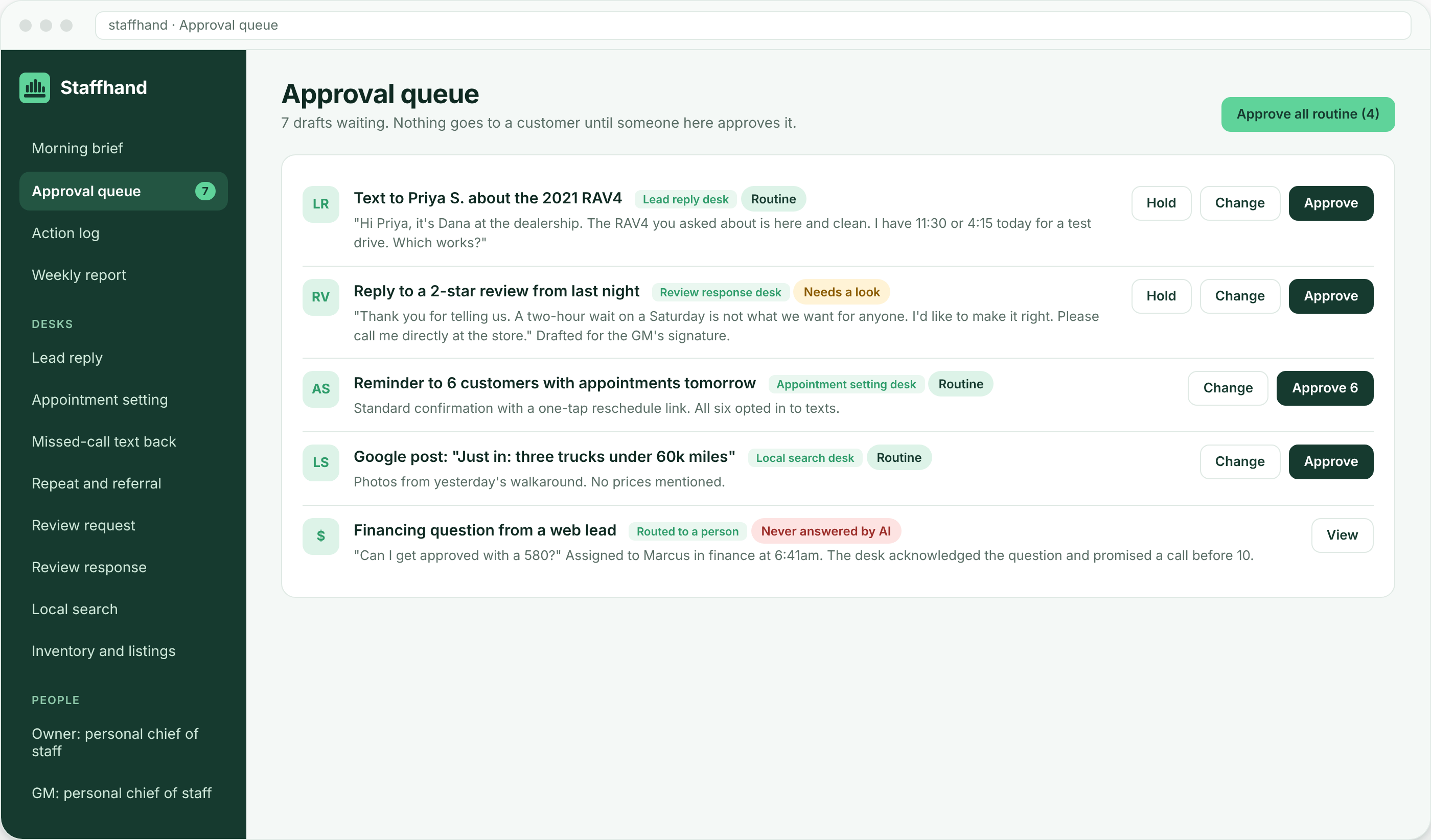
- Approval first. Every desk drafts. Nothing customer-facing goes out until a person on your team approves it, changes it or holds it. Routine items are grouped so a batch takes one tap. As you build trust you can let specific, low-risk items (a review request after a delivery, a reminder the day before an appointment) go out on a rule you wrote. You loosen the rules; we never do it for you.
- Money questions go to a person. Price, quotes, estimates, trade value, financing, credit, refunds, rates and anything that sounds like a negotiation are routed to the right person with the context attached. The AI never answers them, even when it could guess. This is a hard rule, not a setting.
- You own the accounts and the data. Phone numbers, review profiles, CRM, ad accounts, email and the AI accounts themselves are opened or kept in your name. Every draft, every reply and every log is yours. If you leave, you keep all of it and we lose access.
- Nothing runs unattended. People at Staffhand watch the desks every working day. If a desk starts drafting badly, a system disconnects or a customer gets upset, a person steps in and you hear about it in the next brief.
What you see every day
The morning brief
One short read before the day starts: what came in overnight, what needs your decision, what the desks already handled, and what was routed to a person. It is written by the company chief of staff from the systems it is connected to, in plain language. Read about the morning brief.
The approval queue
Every draft from every desk lands in one queue, labelled by desk, with the customer’s message and the proposed reply side by side. Approve, change or hold. Money questions never enter the queue; they are already with a person. How approval mode works.
The action log
Every action a desk takes is written down: what it drafted, who approved it, when it went out, what the customer did next, and every hand-off to a person with the reason. The log is searchable by customer, desk and day, and it lives in your accounts. If you ever want to know why a text went out, the answer is one search away.
The weekly report
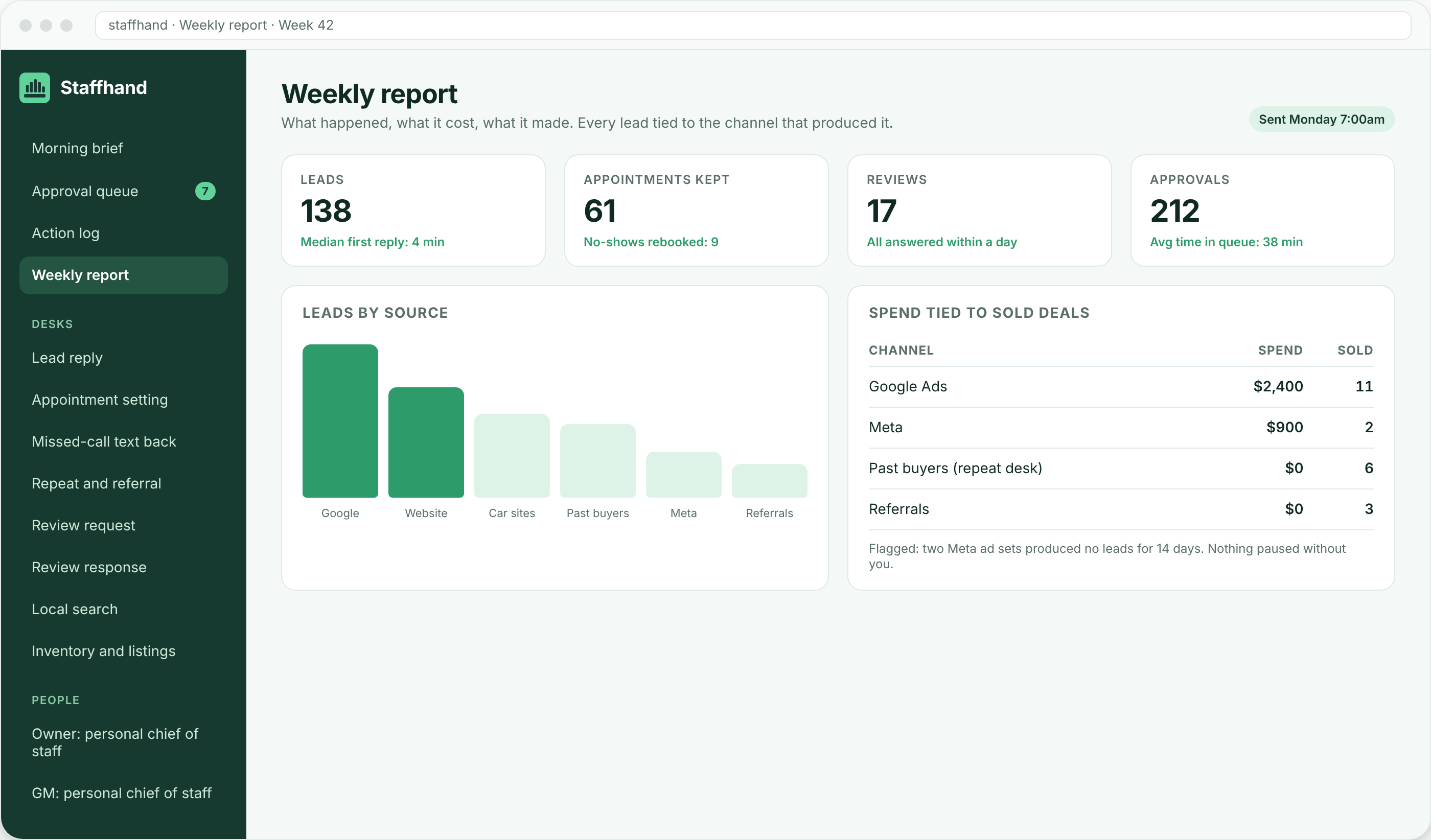
Every Monday: leads by source, appointments kept, reviews answered, what each channel cost and what it produced, and what each desk did all week, in numbers you can check against your own systems. The weekly report desk.
Rules that change, and rules that do not
You can change: which items need approval and which can go out on a rule, quiet hours for texting, who gets each kind of hand-off, how often the brief arrives, and what the weekly report counts. You cannot turn off: the money-question rule, the action log, your ownership of the accounts, or our daily watch. Those are what make the rest safe to loosen.
Frequently asked questions
Can the AI send an email or text without me?
Not at the start. Every message is approved by a person on your team. Later, you can write a rule that lets a specific low-risk message go out on its own, and you can revoke that rule at any time. Money questions are never covered by such a rule.
Does it take actions or just answer questions?
It takes actions: drafting replies, booking times, updating the CRM, preparing invoices, queueing review requests. Each action is either approved by a person first or allowed by a rule you wrote, and every action is logged.
How does it hand off to a person?
The desk stops, writes a one-line summary with the customer’s message and history, and sends it to the person you named for that kind of question, by text, email or your CRM. The customer gets a short acknowledgement that a person will be in touch. The hand-off is in the brief and the log.
What if a desk makes a mistake?
A person on our side pauses that desk, you hear about it in the next brief, and the fix is logged. Because drafts are approved before they go out, most mistakes are caught in the queue, not by a customer.
See how the rules are set up during the first month in how it works, and what they look like in a real industry on example builds.