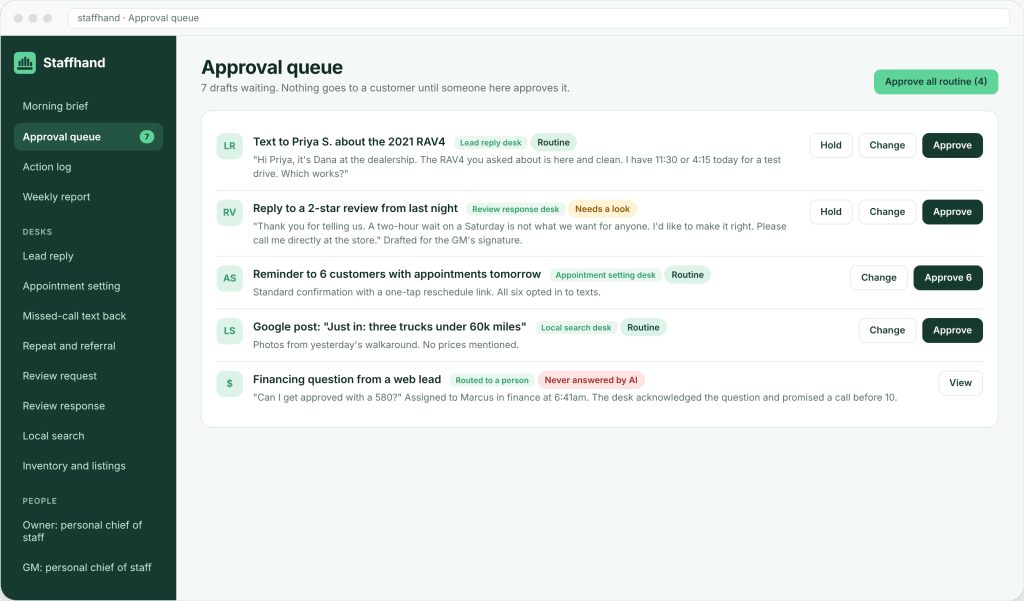
Every agent in a Staffhand build starts in approval mode. It drafts, and a person decides. Nothing customer-facing goes out until someone on your team has looked at it.
The mechanism that makes this workable is a single approval queue. Here is how it works, what the three choices are, what never enters the queue at all, and why it earns trust in the first months.
One queue, not one per agent
A dealership build has 22 specialist desks. If each one had its own inbox of drafts, nobody would check them all. So they share one.
Every draft that needs sign-off, from every desk, lands in one place. A lead reply, a review response, a social post, a website change, a template update, a budget recommendation. The company chief of staff routes each item to the right person. The salesperson sees their follow-up drafts. The manager sees review replies and budget items. The owner sees what the owner asked to see.
The queue is the same whether the build is a gym with five agents or a dealership with twenty-two. The size changes; the structure does not.
Approve, change, hold
Each item in the queue gets one of three actions.
Approve. The draft goes out as written. The action is recorded in the live log with a time.
Change. The person edits the draft and sends the edited version. The edit is recorded, and the agent learns from it. If the same kind of edit keeps happening, the template or the rule gets updated so the agent stops making that mistake.
Hold. The draft waits. Maybe the person wants to check something first. Maybe the timing is wrong. Held items stay in the queue and show up in the next morning brief as still waiting.
There is no fourth option where the agent sends on its own because nobody got to it. An unapproved draft is an unsent draft.
Templates approved once
If every message needed fresh approval forever, the queue would be a bottleneck.
Early in a build, every draft is reviewed. That is deliberate. It is how your team teaches the agent your voice and your rules, and how you see for yourself what it writes. As patterns settle, routine messages move onto templates you have approved once. A booking confirmation, a review request after a sale, a service reminder: once the template is approved, it runs on that template without a fresh approval each time.
Anything new, unusual or money-related still comes to a person. One-to-one messages the agent writes fresh still wait for approval. The queue gets shorter over time, but it does not disappear.
The time your side spends on the queue is real, and it is heaviest in the first weeks. We say so up front, in every scope.
What never enters the queue
Some things are not drafted at all. They go straight to a person.
Questions about price, trade value, credit and financing are the main case. The agent does not draft an answer for you to approve. It acknowledges the question, confirms what it can (availability, a time to come in), and hands the money question to a named person on your team. That person answers directly. The rule and the reasoning are in why AI should never quote price, trade value or financing.
The queue still shows the routed question so you can see it was handed off and to whom. But there is no AI-written answer sitting there waiting for a click.
A few other things are built in, not queued. Only opted-in customers are texted. STOP is honored right away. Quiet hours apply. A shared contact limit means one customer hears from one desk at a time. These are rules the agents follow, not decisions you make item by item.
Human oversight on both sides
Approval mode is your side of the control. Staffhand has its own. People at Staffhand review what the agents do. Every template, post and site change is reviewed by a person at Staffhand before it reaches your queue. Edge cases get tested on purpose: after-hours surges, negative reviews, unusual requests. Nothing runs unattended.
A draft that reaches your queue has already been looked at once. Your approval is the second look, and the one that counts.
Why this builds trust
Owners are right to be skeptical of software that talks to their customers. The queue answers that skepticism in a specific way.
You see every draft before anyone else does. You correct it, and you see it stop making that mistake. After a few weeks, you know what it writes and what it will not write, because you watched. Trust is built from evidence, not from a promise on a sales page.
The live action log backs this up. Every action, with a time. If a customer asks why they got a message, the answer is in the log.
The morning brief lists what is waiting in the queue, grouped by desk. The weekly report shows what went out and what it produced. See the morning brief and how it works.
Start with a digital audit
Approval mode is how every build runs from week one. Before that, the audit shows which desks your business needs and what will flow into your queue. Start with a digital audit.